How to book Chennai metro rail tickets via whatsapp
Public transport in Chennai has become smarter and more convenient over the years. Chennai Metro Rail Limited (CMRL) continues to adopt digital solutions that save time and reduce queues. One of the most useful innovations is booking Chennai Metro Rail tickets through WhatsApp.
This feature allows commuters to plan their journey, buy tickets, and travel without standing at ticket counters. In this guide, you will learn how to book Chennai Metro tickets via WhatsApp, the benefits, payment options, and common questions.
By the end of this article, you will know exactly how to use WhatsApp for a smooth metro journey. Now, Chennai Metro Rail has Launched Ticket booking through Whatsapp for the convenience of its commuters. Which is believed very easy, fast and reliable method in few clicks via phone.
What Is Chennai Metro WhatsApp Ticket Booking?
Chennai Metro WhatsApp ticket booking is a chat-based ticketing service introduced by CMRL. It lets passengers purchase metro tickets using WhatsApp on their smartphones.
Instead of downloading another app or visiting a station counter, users can simply chat with the official Chennai Metro WhatsApp bot. The system guides passengers through ticket selection and payment.
Once booked, passengers receive a QR code ticket directly on WhatsApp. They can scan this code at AFC gates and enter the station.
This system works for both regular commuters and occasional travelers.
Why Book Chennai Metro Tickets via WhatsApp?
WhatsApp ticket booking offers several advantages for daily metro users.
First, it saves time. Passengers no longer need to wait in long queues.
Second, it reduces physical contact, which improves hygiene and safety.
Third, it works on most smartphones without additional installations.
Moreover, the interface feels familiar. Almost everyone already knows how WhatsApp works.
Here are some key benefits:
- No need to download a separate metro app
- Quick ticket booking from anywhere
- Secure digital payment options
- QR code-based entry at stations
- Ideal for tourists and occasional riders
Because of these benefits, WhatsApp ticketing has become increasingly popular.
Requirements for Booking Chennai Metro Tickets via WhatsApp
Before you start, ensure you meet these simple requirements.
You need an active WhatsApp account on your smartphone.
You also need a stable internet connection.
Finally, you must have access to a digital payment method.
Supported payment options usually include:
- UPI
- Debit cards
- Credit cards
- Net banking
Keep your phone charged before traveling. You will need it to scan the QR code.
Here the step by step procedure to book the ticket via Whatsapp
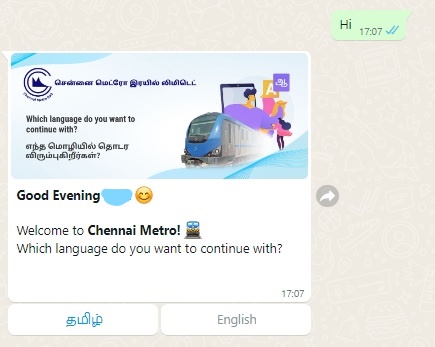
Step 1 : Open the WhatsApp app from your mobile phone and send ' Hi' to +91 83000 86000. (You can save the number in your contact list)
You can also scan the QR code from the metro station.
Step 2 : Then Select the Language you want to continue with. ( You may Choose English / Tamil as of now )
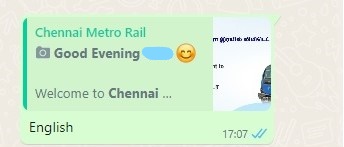
Step 3: Then Click the Book Your Ticket option in the Menu ( There are also other menu like, Near by Station, More Options )
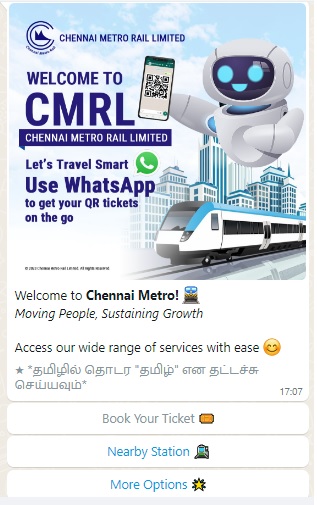
Step 4 : Once you have selected Book your Ticket Option, You may have to select the " Choose the station Option "
If you're travelling on the same Metro route frequently, and saved favourite routes. Then you can proceed with ‘quick booking feature’.
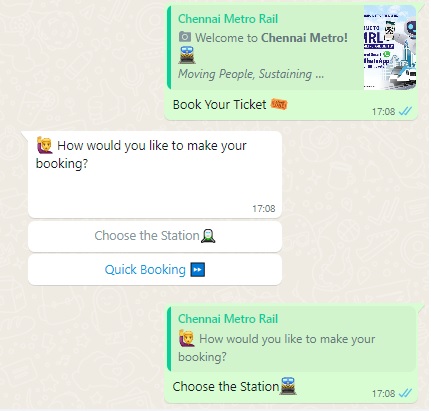
Step 5 : Then Choose your origin / Departure Metro Station from the list provided. ( Stations are listed on the alphabetical order.
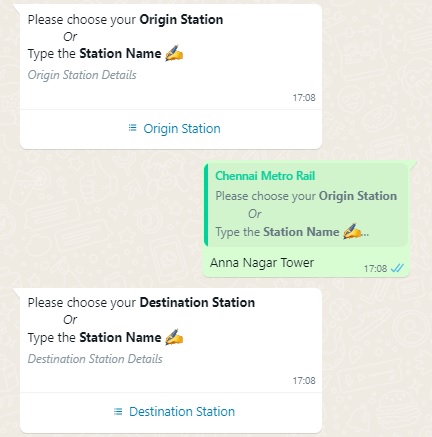
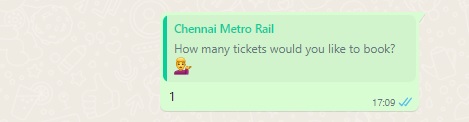
Step 6 : Then Choose destination Station from the list of Metro stations given, and Choose the number of Tickets, you would like to book.
We can book maximum 6 Metro Rail Tickets per Booking via Whatsaap.
Step 7 : Then Ticket Details will be displayed for your confirmation like, Origin Station, destination, Date of Travel, Total Number of Passengers, via Stations and Total Ticket fare.
We need to confirm the Ticket details before Proceeding for payment
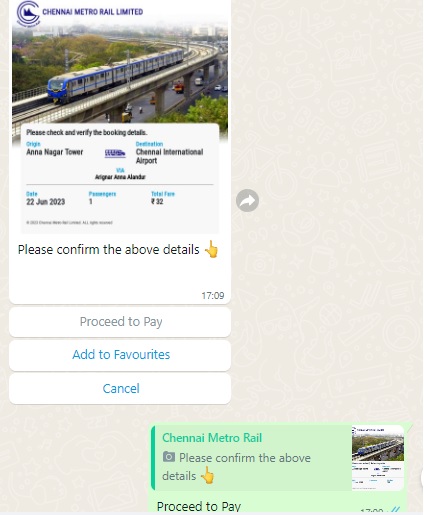
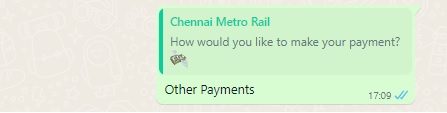
Step 8 : After Selecting Proceed to Pay, There are Three option displayed to make the Payment for Metro rail Ticket ( Pay with UPI / Other Payments / Cancel )
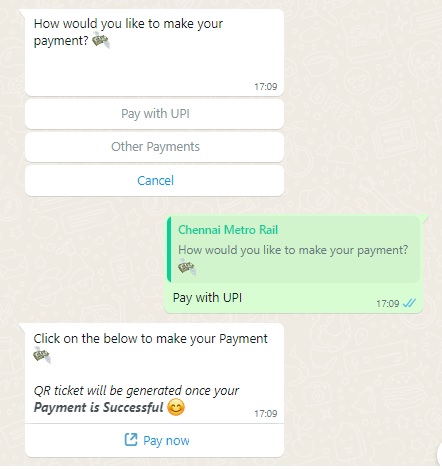
Step 8 : Based on your preference, select the relevant payment method and process the Pament for Chennai Metro Rail Ticket.
After making the successful payment, QR Code will be generated on the Whatsapp along with Ticket details.
Now You can travel with this Code to the station as booked !
Its Cool ! Try yourself and enjoy the easy travel with Chennai Metro !
Step-by-Step Guide: How to Book Chennai Metro Rail Tickets via WhatsApp
Booking Chennai Metro tickets through WhatsApp is simple and fast. Follow these steps carefully.
Step 1: Start a Chat with the Official Chennai Metro WhatsApp Number
Save the official Chennai Metro WhatsApp number on your phone.
Open WhatsApp and send a “Hi” message to begin.
The automated chatbot will respond immediately.
Tip: Always use the official number provided by CMRL to avoid fraud.
Step 2: Choose the Ticket Booking Option
The chatbot will display multiple options in the chat menu.
Select the option related to ticket booking.
Next, choose whether you want:
- A single journey ticket
- A return ticket (if available)
The system will then ask for journey details.
Step 3: Enter Journey Details
Now, enter your travel information accurately.
You must select:
- Source station
- Destination station
- Number of passengers
Double-check the details before proceeding. Incorrect inputs may cause entry issues at the gate.
Step 4: Confirm Fare and Proceed to Payment
After entering the journey details, the chatbot will show the fare amount.
Review the total carefully.
If everything looks correct, confirm and proceed to payment.
The chatbot will redirect you to a secure payment gateway.
Step 5: Complete Payment Securely
Choose your preferred payment method and complete the transaction.
The payment process usually takes only a few seconds.
Once payment succeeds, you will receive confirmation instantly.
Step 6: Receive Your QR Code Ticket on WhatsApp
After successful payment, your QR code ticket will appear in the WhatsApp chat.
Save the message or keep the chat open.
You will need the QR code at the metro station.
Step 7: Scan QR Code at Entry and Exit Gates
At the station, scan the QR code at the automatic fare collection gate.
The gate will open once the scan succeeds.
Use the same QR code to exit at your destination station.
Important Things to Remember While Using WhatsApp Tickets
While WhatsApp tickets are convenient, keep these points in mind.
- QR code tickets are usually valid for a limited time
- Screenshots may not work if the QR code refreshes
- Do not share your ticket with others
- Follow station staff instructions if scanning fails
Keeping your phone brightness high improves scanning success.
Is WhatsApp Ticket Booking Safe?
Yes, Chennai Metro WhatsApp ticket booking is safe when used correctly.
CMRL uses secure payment gateways for transactions.
Personal data stays protected within encrypted systems.
However, passengers should remain cautious.
Avoid clicking on unknown links.
Never share OTPs or payment credentials.
For official updates, always refer to the Chennai Metro Rail Limited website.
You can visit the official site here: https://chennaimetrorail.org/
This outbound link helps you verify the latest ticketing guidelines.
Who Should Use WhatsApp Metro Ticket Booking?
This service suits many types of commuters.
Daily office commuters benefit from time savings.
Students find it easy and fast.
Tourists avoid confusion at ticket counters.
Senior citizens may still prefer counters. However, tech-savvy users of all ages can use WhatsApp tickets comfortably.
WhatsApp Ticket Booking vs Other Ticketing Options
Chennai Metro offers multiple ticketing methods.
Each option has its own advantages.
| Ticketing Method | Best For |
|---|---|
| WhatsApp Ticket | Quick, app-free booking |
| Mobile App | Frequent users with saved details |
| Token Counter | Cash users |
| Travel Card | Daily commuters |
WhatsApp ticketing stands out for its simplicity and accessibility.
Common Problems and How to Fix Them
Sometimes users face minor issues.
- If payment fails, retry after a few minutes.
- If the QR code does not scan, increase screen brightness.
- If the ticket expires, book a new one.
For unresolved issues, contact CMRL customer support at the station.
Future of Digital Ticketing in Chennai Metro
CMRL continues to expand digital services.
WhatsApp ticketing is just one step forward.
In the future, we may see:
- Integration with smart wearables
- Faster QR scanning systems
- Personalized travel notifications
Digital ticketing makes urban transport smarter and more efficient.
Frequently Asked Questions (FAQs)
1. Can I book Chennai Metro tickets via WhatsApp without downloading any app?
Yes. WhatsApp ticket booking works without installing any additional application.
2. Is WhatsApp ticket booking available for all Chennai Metro stations?
Yes. It is generally available across operational Chennai Metro routes.
3. Can I cancel or refund a WhatsApp metro ticket?
Usually, QR code tickets are non-refundable. Check current CMRL policies before booking.
4. How long is a WhatsApp metro ticket valid?
Ticket validity is limited. You must enter the station within the allowed time.
5. What should I do if my phone battery dies after booking?
You may face entry issues. Always keep your phone charged before travel.
6. Is WhatsApp metro ticket booking safe for online payments?
Yes. Payments use secure and authorized gateways approved by CMRL.